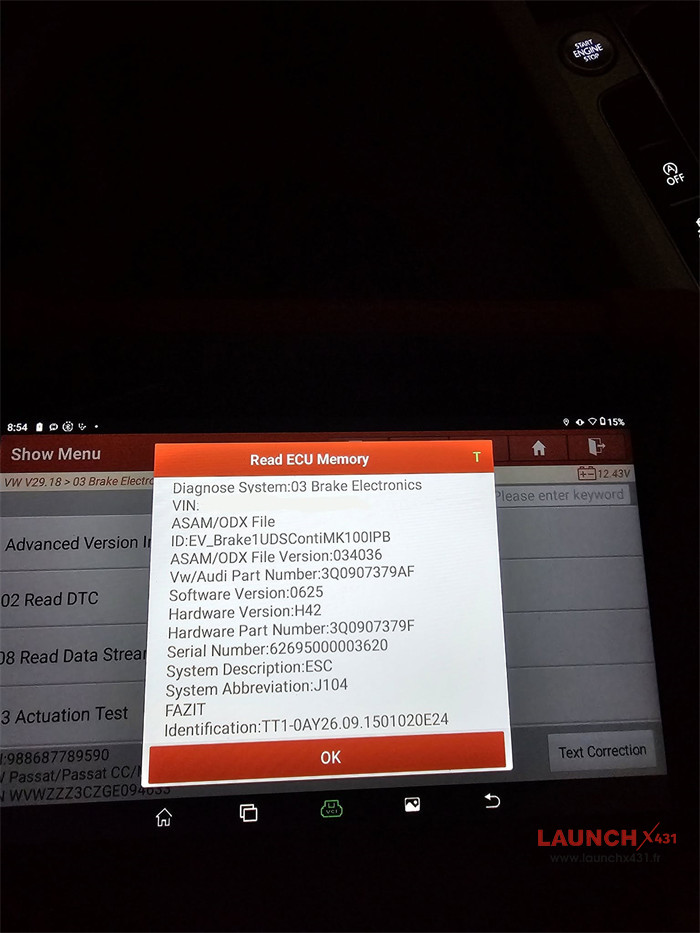
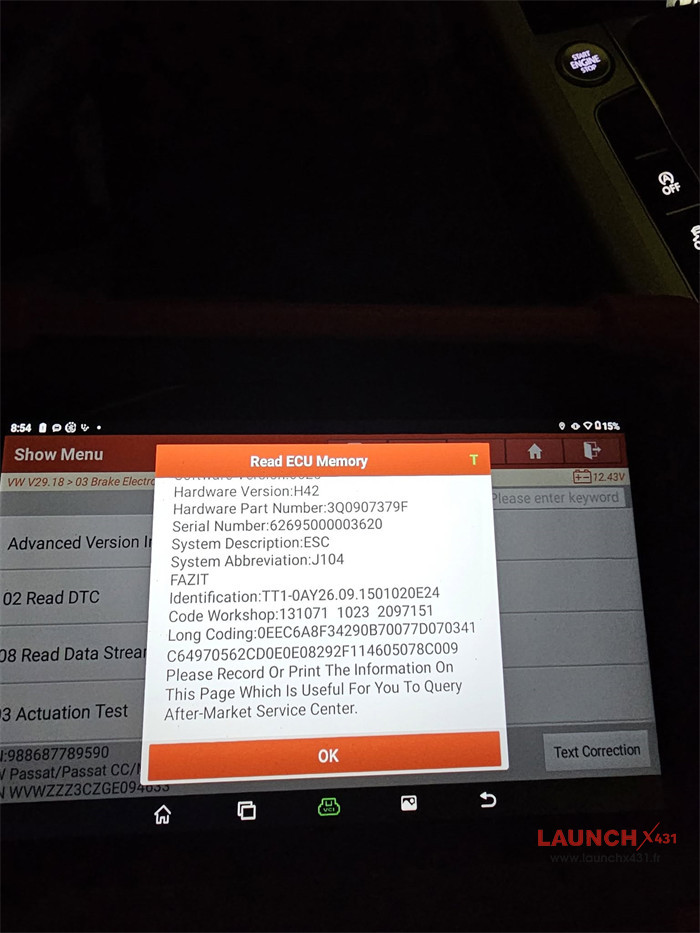
If you use Launch X431 CRP919X BT for VAG diagnostics, coding, adaptations, and guided functions. When accessing the 03 – ABS Brakes control unit (EV_Brake1UDSContiMK100IPB, part numbers such as 3Q0 907 379 AB or 3Q0 907 379 AF), you may encounter rejection errors when attempting to save changes to specific adaptation channels like Brake Disc Drying.

Why SFD Protection Is Not the Issue (2015–2019 Models)
Volkswagen introduced SFD (Vehicle Diagnostic Protection) on newer MQB Evo platforms starting around 2020–2021 (such as the Golf Mk8 and later Passat B8.5 models). A 2015–2019 VW Passat B8 operates on the standard MQB architecture and does not require an online SFD token. Instead, write access to adaptation channels is controlled by UDS Security Access (Login) codes, module operating conditions, and the specific firmware revision installed on the ABS pump.
Step-by-Step Troubleshooting & Resolution Guide
Follow this structured diagnostic workflow on your CRP919X BT to avoid triggering a security lockout and to verify module compatibility.
Step 1: Stabilize Vehicle Voltage and Operating Conditions
ABS control modules are sensitive to voltage fluctuations and vehicle state during adaptation procedures.
1. Connect a battery charger or maintainer to keep system voltage stable at 12.5V or higher.
2. Switch the Ignition ON while keeping the Engine OFF.
3. Ensure the vehicle is completely stationary on a level surface, and release the Electronic Parking Brake (EPB) if safe to do so.
Step 2: Check for Temporary Security Access Lockouts
Entering an incorrect security access code 2 to 3 times consecutively activates a built-in anti-brute-force timer inside the Continental MK100 ABS ECU. While this lock timer is active, the module will automatically reject even the valid login code.
1. Connect your Launch CRP919XBT OBD2 scanner to the vehicle and navigate to 03 – ABS Brakes.
2. Open Read Data Stream (Live Data).
3. Search for parameters related to Security Access or Lock Time.
4. If an active countdown timer is displayed, leave the Ignition ON (Engine OFF) until the timer counts down to 0 before attempting another login.
Step 3: Record Exact ECU Part Number and Software Version
Within the 3Q0 907 379 ABS family, Volkswagen used multiple hardware suffixes and firmware revisions, each with different accepted security keys and adaptation channel mappings. Navigate to Module Information / Version Information in 03-ABS and note:
• Part Number (SW / HW): e.g., 3Q0 907 379 AB or 3Q0 907 379 AF
• Software Version: e.g., 0625 or 0723
• ASAM / ODX File: EV_Brake1UDSContiMK100IPB
Step 4: Test Verified VAG MK100 Security Access Codes Cautiously
Once you confirm Lock Time = 0 and stable voltage, enter Security Access (Login) and test the following documented VAG MK100 codes one time only per code (do not repeatedly guess unlisted codes):
• 40304 – Standard primary login code used across many MK100 units for Brake Disc Drying and Hill Start Assist adaptations.
• 24990 – Documented alternative security access code for specific 5Q0 / 3Q0 907 379 IPB variants when 40304 is not accepted.
• 44595 – Secondary alternative login code applicable to certain Continental MK100 firmware revisions.
Note on Firmware Variations & Session Modes: Avoid forcing unfamiliar engineering or End-of-Line (EOL) diagnostic session modes unnecessarily, as standard UDS adaptations rely directly on valid Security Access permissions. Keep in mind that certain factory firmware revisions (such as specific 3Q0 907 379 AF versions) restrict public adaptation access entirely and may not accept any public login code for this channel.
Step 5: Check VAG Guided Functions & Software Updates
If standard adaptation access remains restricted on your specific ABS firmware revision:
1. Check the VAG Guided Functions menu inside the Launch X431 VAG diagnostic software to see if a guided service routine is available for your vehicle configuration.
2. Ensure your Launch CRP919X BT VAG software package is updated to the latest version via Wi-Fi to maintain the newest ODX/ASAM database mappings.
Important Safety Notice: Brake Disc Drying periodically applies light brake pad pressure during wet driving conditions to clear water film from the brake rotors. Disabling this factory safety feature is generally not recommended for daily road use, as it may slightly increase wet-weather braking response times.
Diagnostic Error Reference Table
| Error Message on Scanner | Likely Cause | Recommended Action |
| Incorrect Code / Security Access Denied | The specific ABS firmware does not accept that login key, or the module is temporarily locked. | Confirm Lock Time = 0 in Live Data, then test 24990 or 44595 once. |
| Conditions Not Correct / Request Sequence Error | Engine is running, battery voltage is below threshold, or safety prerequisites are unmet. | Turn engine OFF (Ignition ON), connect a battery charger (>12.5V), and keep the vehicle stationary. |
| Function Failed / Channel Not Available | The factory firmware version blocks modification of this adaptation channel via public login codes. | Check VAG Guided Functions or verify whether the specific ECU software revision supports the adaptation. |
Frequently Asked Questions (FAQ)
1. Does a 2016 VW Passat B8 require SFD unlocking on X431 CRP919X BT?
No. Volkswagen SFD gateway protection applies only to newer MQB Evo models produced from 2020–2021 onward. A 2016 Passat B8 uses traditional UDS Security Access codes for module coding and adaptations.
2. Why does the ABS module reject code 40304 on my Passat B8?
Although 40304 is the most common security code for Continental MK100 ABS units, Volkswagen modified security access algorithms across different hardware suffixes and software versions (such as 0625 vs. 0723). If 40304 is rejected, verify that the module is not locked out and try 24990 or 44595 once.
3. How do I clear a security access lockout on a VW Continental MK100 ABS unit?
If too many incorrect login codes are entered, leave the ignition switched ON with the engine off (with a battery maintainer connected) for 10 to 30 minutes. You can monitor the remaining wait time in 03 – ABS Brakes > Live Data > Lock Time.
4. Can Launch X431 CRP919X BT perform VAG coding and adaptations?
Yes. CRP919X BT supports ECU Coding, Adaptation, Bi-Directional Active Tests, and VAG Guided Functions across Volkswagen, Audi, Skoda, and SEAT models. For optimal compatibility with UDS control modules, always keep the diagnostic software updated via Wi-Fi.
www.launchx431.fr