Problem:
When using Launch X431 CRP919EBT on newer Mercedes-Benz vehicles, some users may encounter the following messages when attempting special functions:
- Encryption gateway authentication failed and test functions are limited.
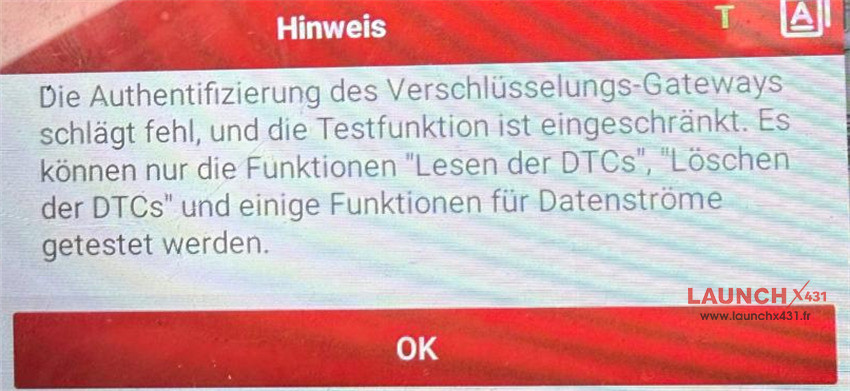

- The function is not activated. Incorrect code: 1000699
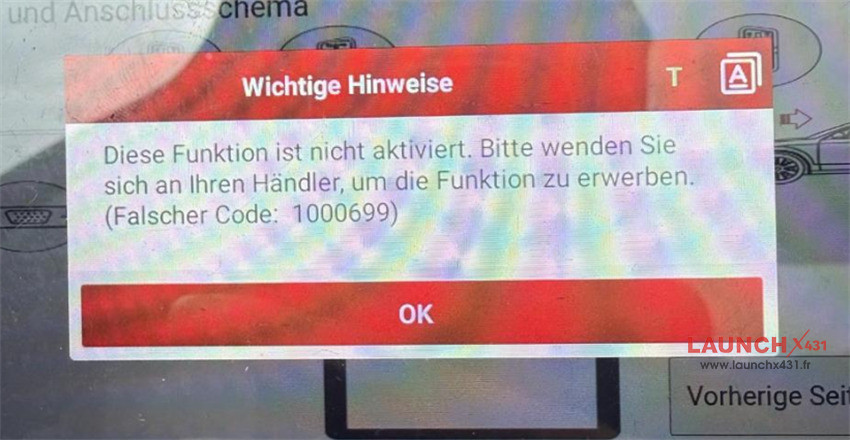

These errors typically indicate that the vehicle’s Security Gateway (SGW) access has not been activated on the diagnostic tool.
Why Does This Happen?
Many Mercedes-Benz models produced after 2020 are equipped with an encrypted gateway system that restricts access to advanced diagnostic and service functions. Without proper authorization, the diagnostic tool can only perform limited operations.
In most cases, users can still access:
- Read DTCs
- Clear DTCs
- View some live data streams
However, advanced functions, coding, adaptations, and certain service procedures may remain unavailable.
How to Unlock Mercedes SGW Access
To gain full diagnostic access, you need to purchase and activate the European SGW Function License on your Launch device.
Path:
Mall → Other Goods → Other Software Packages
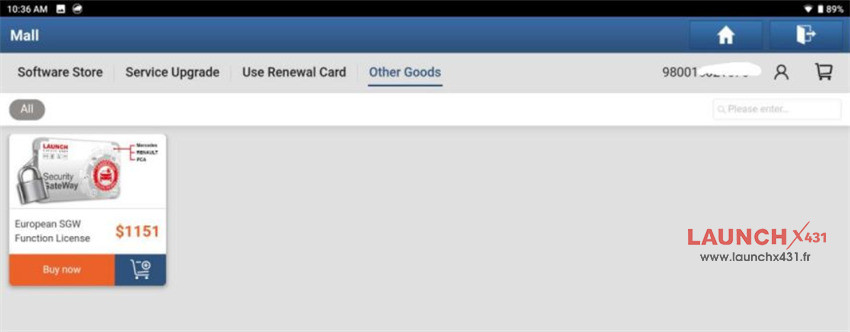

After activation, the gateway can be unlocked on supported Mercedes-Benz vehicles, allowing access to advanced diagnostic functions.
What’s Included in the European SGW Function License?
The package includes:
- Mercedes-Benz Gateway License (1 Year)
- FCA & Maserati Gateway License (1 Year)
- Renault & Dacia Gateway Access (50 Connections)
Note: The license must be renewed after expiration.
Conclusion
If your Launch CRP919EBT displays gateway authentication errors such as “Encryption gateway authentication failed” or “Incorrect code: 1000699,” the issue is usually related to missing SGW authorization rather than a problem with the scanner itself. Activating the European SGW Function License restores access to protected Mercedes-Benz gateway functions and helps ensure full diagnostic capability on supported models.