






Customer problem:
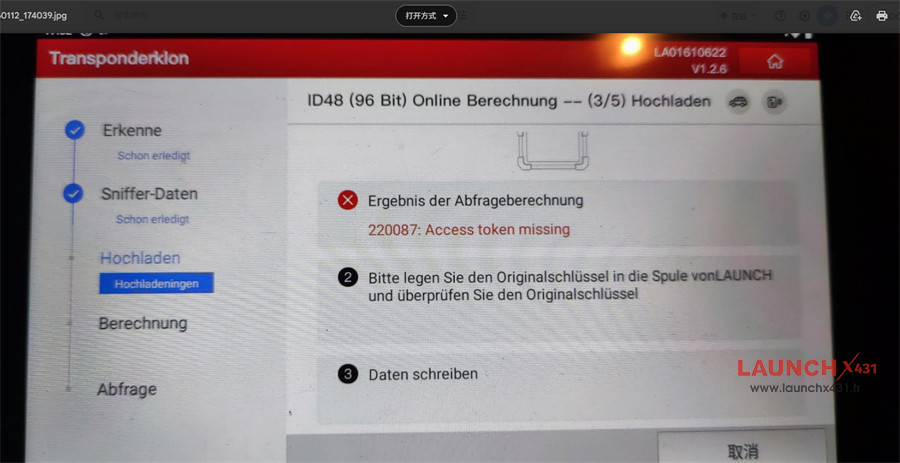
Launch X431 Key Programmer failed to clone ID48 chip, it appeared the error message “220087: Access token missing” in the third step of the cloning process.
LaunchX431.fr engineer replied:
Why it happens:
- No Internet: Your X431 can’t reach Launch’s servers to get authorization.
- Token/Subscription Issue: ID48 cloning, especially for newer models, often uses paid tokens, and the server denies access.
- Clone Device Blocked: “Clone” devices often get cut off from online services by Launch, causing authentication failures for advanced functions like ID48.
- Server Problems: Occasionally, Launch’s servers might be down.
How to fix it:
1.Connect to Wi-Fi: Ensure your X431 tool is connected to the internet.
2.Check Subscription: Go to the system settings/diagnostics and check your account status (though this is often a dead end for clones).
3.Try a Different Vehicle/Function: See if other functions work to rule out server-wide issues.
4.Use a Known Good Clone/Server: For clones, some users find specific firmware or server bypasses, but this is risky and often requires finding specific clone community advice.
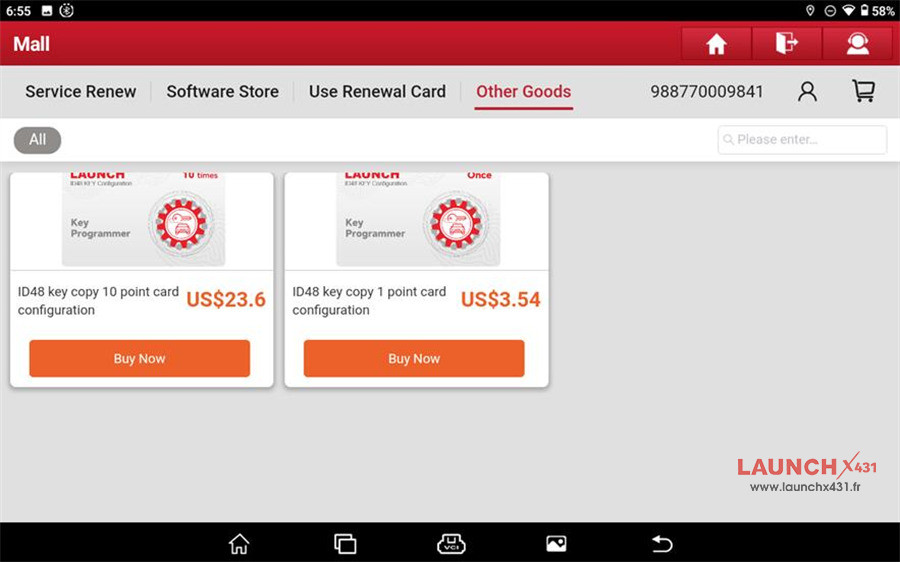
5.Purchase Official Tokens (If Genuine): If you have a genuine device, buy the necessary ID48 tokens in Launch Mall
Navigation path: Mall-> Other Goods
Choose the token package you want:
- ID48 key copy 10 point card configuration (US$23.6)
- ID48 key copy 1 point card configuration (US$3.54)
Learn more:
Tech support:
- Email: sales@launchx431.fr
- WhatsApp: +86 18750906257