



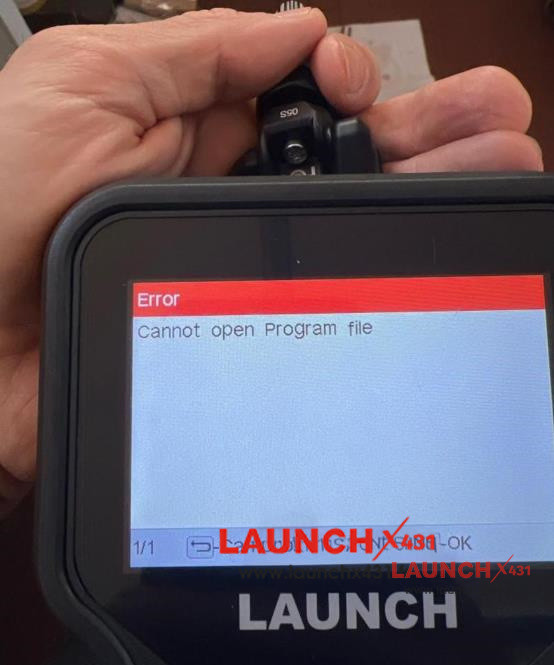
When programming TPMS sensors, encountering a sudden software glitch can stall your entire workshop workflow. A common issue some technicians face with LAUNCH CRT5011E TPMS tool is the frustrating “Cannot open Program file” error.
Below, we break down a real-world user case study and provide the exact step-by-step factory solution to permanently fix this bug.
The Problem: Programming Fails at 6%
User Case Study:
“I am using a LAUNCH CRT5011E to program brand-new Launch LTR-05 / LTR-05S RF tire pressure sensors. The programming sequence initiates normally but abruptly freezes at around 6%, throwing the error message: ‘Cannot open Program file’. Are there specific firmware updates or configuration settings I need to check to resolve this?”
The Root Cause
This issue typically occurs due to outdated firmware or missing database files inside the TPMS handheld unit. When CRT5011E attempts to write data to newer generation sensors (like LTR-05 series), the older software profile fails to verify the script, resulting in a programming halt at 6%.
The Official Solution: Solder-Free Software Flash
To fix the “Cannot open Program file” error, you must perform a firmware update using the official Launch PC link utility. Follow these steps:
1. Download the Flash Tool: Navigate to the official Launch global website layout at [en.cnlaunch.com/download/]
2. Install the Utility: Download and install the “DIY integration upgrade tool” onto your Windows PC.
For the detailed upgrade guide, refer to this post below:
Verified Results
After deploying the latest update patch via the DIY integration suite, technicians report complete success:
User Feedback:
“I updated my CRT5011E firmware using the official tool, and now LTR-05 and LTR-05S sensors program flawlessly with zero errors. Highly appreciate the straightforward support!”
www.launchx431.fr